You completed every step—reached level 25, subscribed, or signed up exactly as instructed. But your reward still hasn’t appeared.
The good news: you probably didn’t do anything wrong. Missing credits are usually timing, tracking, or validation issues—not fraud. Here’s how to diagnose the problem in 5 minutes.
TL;DR — The Fast Answer
- Scenario A: Not credited on the offerwall and not on the GPT site → Contact the offerwall
- Scenario B: Offerwall shows hold/pending and nothing on the GPT site → Wait for the hold to clear; contact the offerwall only if it’s overdue
- Scenario C: Offerwall shows credited but it’s missing on the GPT site → Wait a few hours, then contact the GPT site with proof
- Start here: Check the offerwall status first—it tells you where the issue is.
- Timing: Credit speed depends on the offer. Gaming offers can take minutes to hours; subscriptions often take longer.
- What to collect: Screenshots of completion, offer name, timestamps, and any email receipts.
- Avoid rejections: No VPN/proxy/emulator, one account per person, and don’t reinstall to “force” tracking.
The 3 Scenarios (Core Troubleshooting)
Scenario A — Not Credited on Offerwall + Not Credited on GPT Site
What this means: The offerwall hasn’t recorded your completion. This is usually a tracking issue, an incomplete requirement, or progress that didn’t register.
What to do:
- Confirm you started the offer from the GPT site’s offerwall page (not directly from the app store).
- Re-check the offer requirements and timeline—make sure every step was completed exactly as stated.
- Collect proof (screenshots, offer name, timestamps). Jump to what to collect.
- Contact the offerwall support (not the GPT site). Jump to offerwall contact steps.
Important: Don’t reinstall the app or redo the offer. Reinstalls can reset tracking or trigger fraud flags.
Scenario B — On Hold / Pending on Offerwall + Not Credited on GPT Site
What this means: The offerwall recorded your completion, but it’s in a validation period. Advertisers use holds to check for fraud, refunds, chargebacks, or subscription status.
What to do:
- Wait until the stated hold period ends (many offerwalls show an estimate like “7–14 days”).
- Don’t reinstall or retry the offer—this can trigger fraud flags or reset tracking.
- If the hold period has passed (or you have strong proof something is wrong), contact the offerwall. Jump to offerwall contact steps.
Why holds exist: Advertisers use holds to reduce fraud (fake signups, instant refunds, bots) and validate completions before paying.
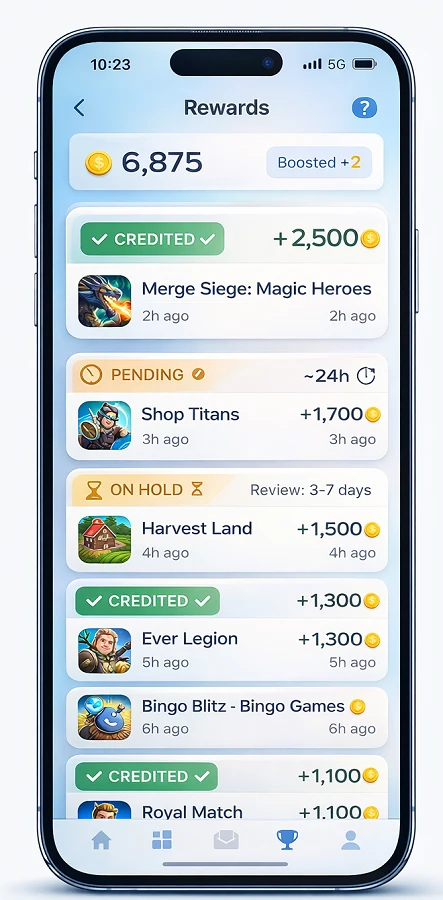
Scenario C — Credited on Offerwall but Missing on GPT Site
What this means: The offerwall approved your credit, but your GPT site hasn’t posted it yet. Usually a sync delay.
What to do:
- Wait up to 24 hours (most GPT sites sync within minutes)
- If still missing after 1 hour, collect screenshots showing the “credited” status on the offerwall
- Contact GPT site support with username, offerwall name, offer name, completion time, and screenshots
Note: GPT sites may hold credits for review. Credits can be rejected later if the advertiser cancels due to refunds, chargebacks, or rule violations.
Quick decision guide:
- Not showing on the offerwall → Contact the offerwall support (tracking/credit didn’t register).
- Pending / On hold on the offerwall → Wait until the hold clears. Contact the offerwall only if it’s past the stated hold time.
- Credited on the offerwall → Contact the GPT site support (offerwall credited, but your site hasn’t synced it yet).
Fast Diagnosis Checklist (2–3 Minutes)
- Check offerwall status first—tracked, pending, on hold, credited, or not showing?
- Review the offer’s stated timeline and terms—did you meet all requirements?
- Verify correct account and device—did you switch devices or use the wrong email?
- Confirm no VPN, proxy, or Private Relay was active—these block tracking
- Gather proof—screenshots, receipts, timestamps
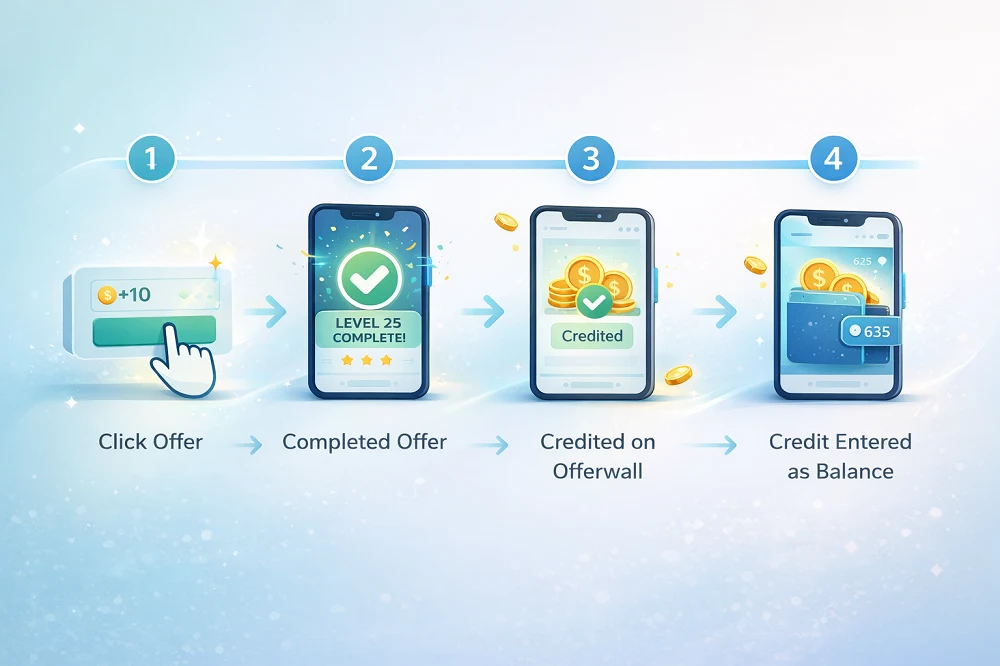
How Credits Actually Move (The Simple Pipeline)
Think of reward credits like a parcel delivery with tracking updates:
Step 1: Click + Tracking — Your click creates a tracking ID that tells the system you started the offer.
Step 2: Offerwall Status Updates — The offerwall monitors your progress and updates status: tracked → pending → on hold → credited (or rejected).
Step 3: Advertiser Validation — The advertiser runs fraud checks or confirms you didn’t refund/uninstall early. This can add days or weeks.
Step 4: GPT Site Posts Credit — Once validated, the offerwall tells your GPT site to credit your account. Some post instantly; others apply their own review period.
The key: Each step takes time. Delays at any stage mean you’ll wait longer—even if you did everything perfectly.
New to GPT sites? Read our guide on how GPT and reward platforms actually work to understand the full earning process.
What Evidence to Collect
Required:
- Offer name + required steps
- Screenshots from the app/game showing completion (level, milestone, confirmation)
- Email receipt or subscription confirmation (if relevant)
Helpful:
- Device model + OS version + browser
- Timestamps (when clicked, when completed)
Why this matters: Clear evidence = faster resolution. Vague reports get generic responses or delays.
Contacting Offerwalls (Where to Report Missing Credits)
Most offerwalls run their own support because they control tracking and validation. If your offer isn’t tracked or credited on the offerwall, contact them directly—not your GPT site.
What to Include When You Contact an Offerwall
Use this template for any offerwall support ticket:
Subject: Missing Credit — [Offer Name]
Message:
Offer Name: [exact name from offer wall]
Date/Time Started: [e.g., Jan 20, 2026, 3:00 PM EST]
Date/Time Completed: [e.g., Jan 23, 2026, 10:30 AM EST]
Country: [e.g., United States]
Device: [e.g., iPhone 14, Android Samsung Galaxy S23]
Steps Completed: [e.g., "Installed app, reached level 25, screenshot attached"]
Proof Attached: [screenshots showing completion]
GPT Platform Used: [e.g., Freeward, Freecash, etc.]
Finding Offerwall Support Links
Each offerwall has its own support system. For a complete list of offerwall contact links and how to reach them, see our detailed guide: How to Contact Offerwalls for Missing Credits.
Can’t find your offerwall?
- Go to the offerwall section in your GPT site
- Look for “Support,” “Help,” or “Contact” within the offerwall interface
- Use the template message above with as much proof as possible
When to Contact the GPT Site (and What to Say)
Contact the GPT site when:
- The offer shows “credited” on the offerwall but hasn’t appeared in your account after 24 hours
- You believe there’s an account sync issue or internal review delay
Template:
Subject: Missing Credit — [Offer Name] Credited on Offerwall
Message:
Username/Email: [your GPT site account]
Offerwall Name: [e.g., "OfferToro," "AdGate," "Lootably"]
Offer Name: [exact name]
Completion Time: [date/time]
Offerwall Status: Credited [attach screenshot]
Screenshots Attached: [offerwall credit proof, completion proof]
Typical response time: Minutes to a few days, depending on site and ticket volume.
Rules That Prevent Rejections
- No VPN, proxy, or Private Relay—these block tracking and trigger fraud systems
- No emulators—use a real device
- One account per person—multi-accounting gets you banned
- No fake info—use your real name, email, and payment details
- Don’t reinstall or “force tracking”—this doesn’t work and may flag you
- Don’t abuse refunds or chargebacks—completing an offer then refunding = fraud
Breaking these rules can lead to permanent bans. Learn more about why GPT accounts get banned and how to avoid it.
FAQ
Final word: Missing credits are annoying but rarely permanent. Follow the steps, collect proof, contact the right party. Most issues resolve within days. Stay patient, stay polite, and don’t violate the rules while troubleshooting.